เสาร์. พ.ค. 2nd, 2026

ThaiGameGuide

ศูนย์รวมข้อมูลเกมฉบับภาษาไทย

วิธีเพิ่มอัตราดรอบไอเทมในเกม V Rising

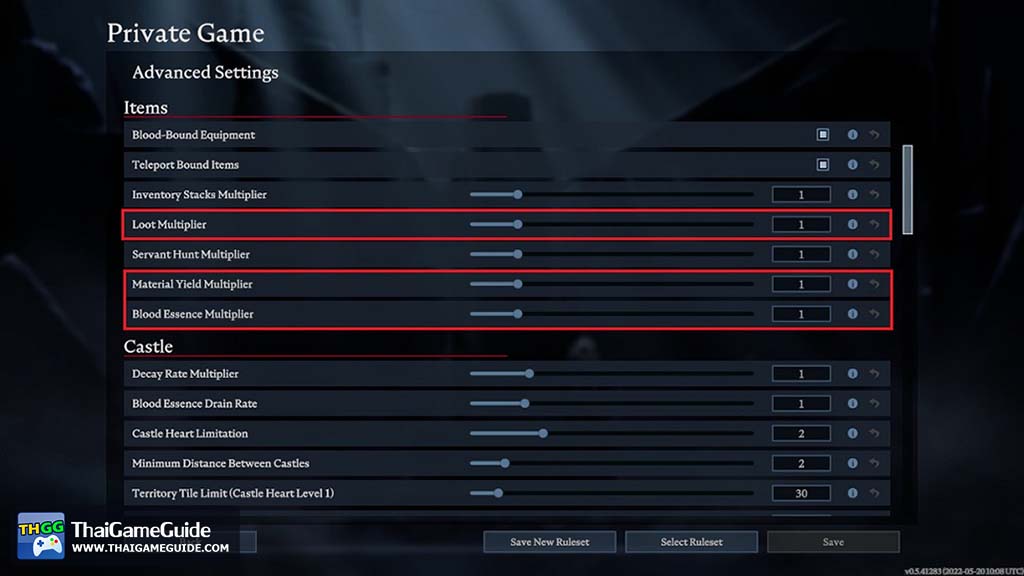
เราสามารถเพิ่มอัตราดรอบไอเทมในเกม V Rising โดยการตั้งค่า Loot Multiplier, Material Yield Multiplier และ Blood Essence Multiplier

สำหรับ Listen Server (Host โดยใช้ตัวเกม)

เราสามารถเพิ่มหรือลดจำนวนได้ที่ Loot Multiplier, Material Yield Multiplier และ Blood Essence Multiplier

สำหรับ Dedicated Server

ไฟล์ ServerGameSettings.json จะอยู่ใน VRisingServer_Data\StreamingAssets\Settings ซึ่งเราสามารถเปลี่ยนการตั้งค่าได้ที่บรรทัดเหล่านี้

  "DropTableModifier_General": 1.0,
  "DropTableModifier_Missions": 1.0,
  "MaterialYieldModifier_Global": 1.0,
  "BloodEssenceYieldModifier": 1.0,

ตัวอย่าง: เปลี่ยนอัตราดรอบไอเทมเป็น x5

  "DropTableModifier_General": 5.0,
  "DropTableModifier_Missions": 5.0,
  "MaterialYieldModifier_Global": 5.0,
  "BloodEssenceYieldModifier": 5.0,
Let us know what you think.

Leave a Reply

How to increase item drop rate in V Rising?

How to increase item drop rate in V Rising?

How to increase item drop rate in V Rising?

You can change item drop rate by change the number in Loot Multiplier, Material Yield Multiplier and Blood Essence Multiplier field in your settings.

For Listen Server (Host via Game Client)

You can change it in Loot Multiplier, Material Yield Multiplier and Blood Essence Multiplier field.

For Dedicated Server

ServerGameSettings.json is located in VRisingServer_Data\StreamingAssets\Settings, You can change it in these lines.

  "DropTableModifier_General": 1.0,
  "DropTableModifier_Missions": 1.0,
  "MaterialYieldModifier_Global": 1.0,
  "BloodEssenceYieldModifier": 1.0,

Example: Change drop rate to x5

  "DropTableModifier_General": 5.0,
  "DropTableModifier_Missions": 5.0,
  "MaterialYieldModifier_Global": 5.0,
  "BloodEssenceYieldModifier": 5.0,

Let us know what you think.

Leave a Reply